
A cookbook for every table you sit at
Make a group for your side of the family, another for the in-laws, one for your supper club and one for the office potluck. Share each recipe with exactly the people it's for.

- IHCLMJ+5The Hoyt Family8 members · 64 recipes
- AKTRSBSunday Supper Club6 members · 23 recipes
- DPLN+12Office Potluck14 members · 31 recipes
How it works
- 1
Create a group
Give it a name, like The Hoyt Family or Sunday Supper Club.
- 2
Invite members
Send invites by email, or share a private invite link in the family group chat.
- 3
Share recipes
Add recipes to the group. One recipe can live in as many of your groups as you like.
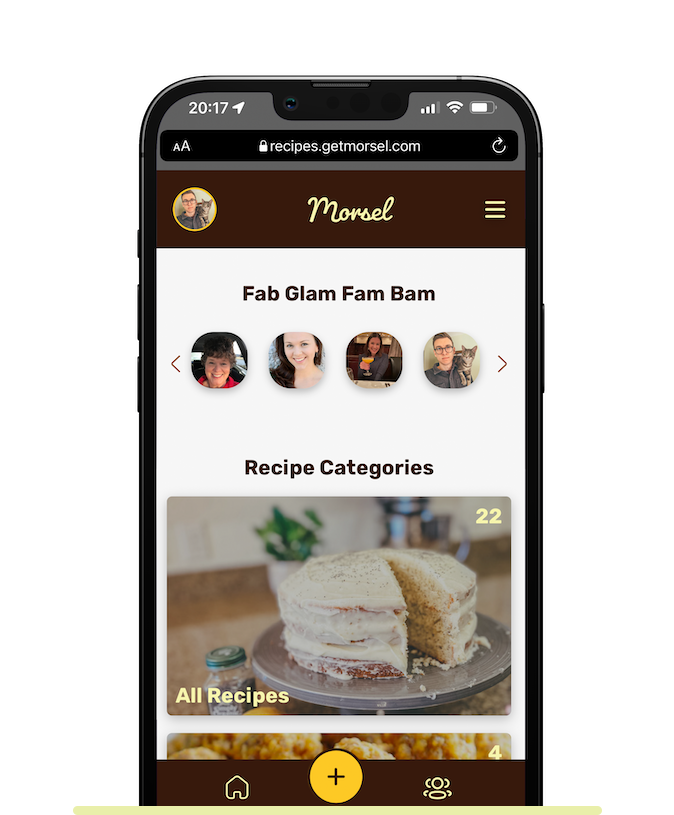
Why families love it
Unlimited groups
Create as many groups as you need, so nobody has to choose between the Smiths and the Joneses.
Everyone can pitch in
Any member can invite others. Owners and admins manage the group, and the owner decides if it ever gets deleted.
Company and club cookbooks
Groups work for coworkers, churches, teams and clubs, too. It's the easiest way to build an employee cookbook.
See it in action
Questions
How many groups can I create?
As many as you like.
Can I share one recipe with more than one group?
Yes. Pick several groups when you add a recipe, or share an existing recipe with another group later.
Do the people I invite need to pay?
No. Invited members can join with a free account. The Pro Family Plan gives up to 6 people Pro features.
Who can manage a group?
Groups have owners, admins and members. Admins and owners can manage members, and only the owner can delete the group.
More ways to keep your family's recipes
Never lose a family recipe again
Bring every recipe, photo and story into one family cookbook your whole family can use.
Get started freeFree for up to 10 recipes. See pricing